ThrumGames
Install and make Thrum yours, the arcade game in SwiftUI + Metal. Version 1.0.0.
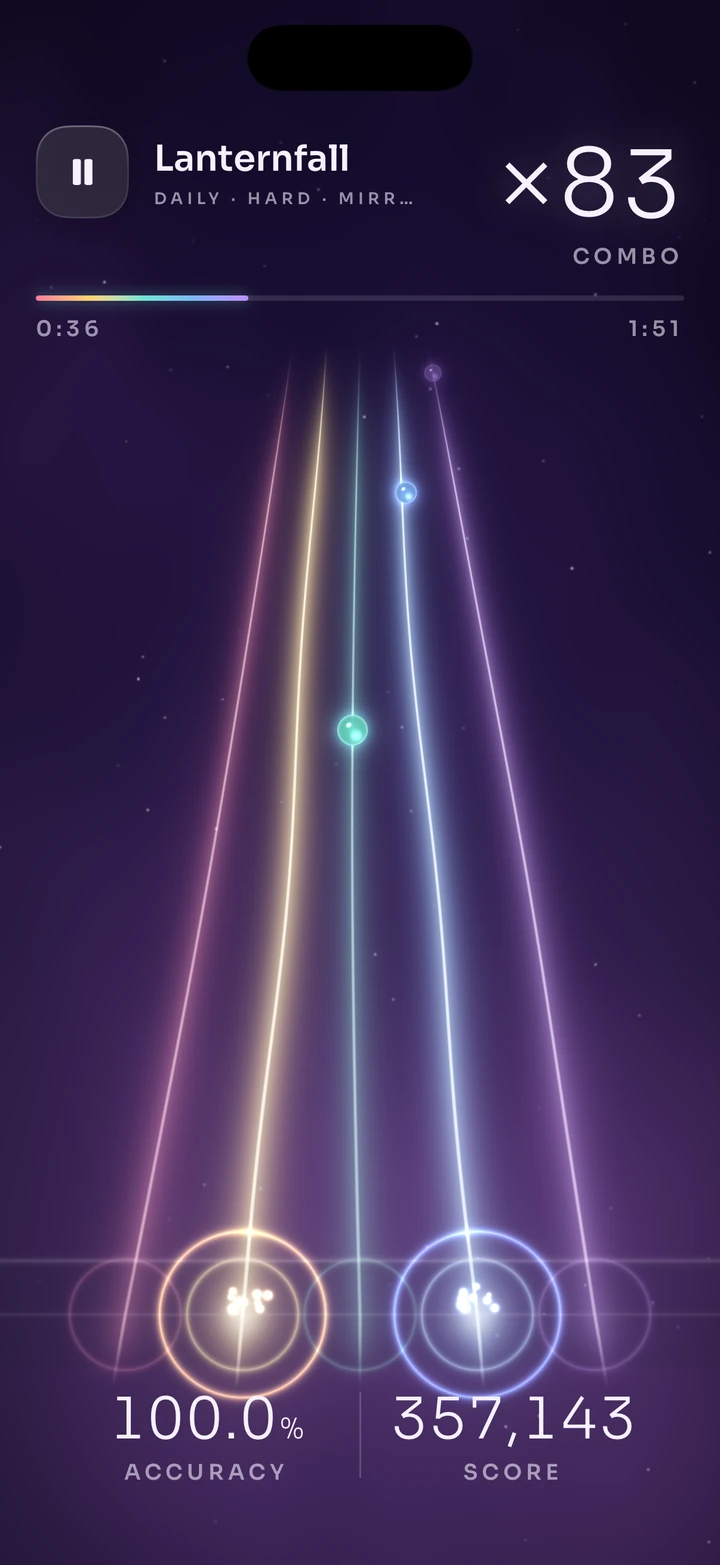
A rhythm game on five strings of light: glass beads slide down to the bridge, and every string you touch rings a note of the song. This guide takes you from download to a running game under your own name. It covers version 1.0.0. See the screens on its game page.
Requirements
- Xcode 26 and an iOS 17.0 or later deployment target
- Tuist 4 (
brew install tuist) - An Apple Developer team for devices, Game Center, iCloud and the widget. The simulator runs without one.
Install
Download
Included with Games. Not signed in? The button takes you to sign in or create an account, then starts the download when you're back. Unzip the archive; it contains one folder, Thrum/.
Make it yours
cd Thrum
scripts/setup.sh --name YourGame --bundle-id com.you.yourgame
The script renames the target, scheme and bundle ids, rewrites the StoreKit product ids and runs tuist generate. To keep the name Thrum for now, run tuist generate instead.
Run it
Open YourGame.xcworkspace, choose an iPhone simulator and run the YourGame scheme. The scheme uses Configuration/Products.storekit, so the shop works before App Store Connect is set up.
What's in the project
- Content: 3 levels
- Game Center: 4 leaderboards, 15 achievements
- Shop: Soft currency packs (glints), Song unlock (Encore), Cosmetic pack
- Built on:
GameCore,Feel,GameServices,Shaders,GameUI - Presets:
aurora,ember,tide - Swift: 7,177 lines in 65 files
Rebrand options
| Option | What it sets |
|---|---|
--name | Target, scheme and product name |
--bundle-id | Bundle id. Modules, the widget, the App Group (group.<bundle-id>) and tests derive theirs from it |
--display-name | The name under the icon |
--team | Your team id. Required for devices, Game Center, iCloud and the widget's App Group |
--product-prefix | App Store Connect product ids. Defaults to the bundle id |
The values live in Tuist/ProjectDescriptionHelpers/AppConfig.swift. Game Center ids are listed in
Configuration/GameCenter.json (four leaderboards, fifteen achievements); create them under your
app in App Store Connect. Products are in Configuration/Products.storekit, which the scheme uses
for local purchases.
The look is one value: GameTheme.thrum(.aurora). Aurora, Ember and Tide are the three presets
(ThrumLook in Modules/GameDesign/Sources/Theme/Themes/Thrum.swift); each sets the five string
colours, the sky and the accent, and both the SwiftUI screens and the Metal uniforms follow.
Structure
App/                  @main, the root stage (Metal strings + phase layer), deep links, the widget feed
Features/Home         Song carousel, difficulty, the Daily Thrum row, the attract loop behind it
Features/Play         In-play HUD: score, combo, judgements, progress, pause and the tuning card
Features/Results      Grade, accuracy breakdown, timing spread, glints, new best
Features/Calibrate    Tap-along latency calibration (input and visual offsets)
Features/Shop         String sets, bead finishes, glints, Encore and the Prism pack
Features/Records      Bests per song and difficulty, lifetime totals, achievements, leaderboards
Features/Onboarding   The lesson intro and the calibration offer
Features/Studio       Chart Studio: record, play back and save your own chart
Features/Settings     Sound, music, haptics, note speed, offsets, motion, contrast, colour vision, assist,
                      and the tools (calibration, Chart Studio, the lesson)
Modules/GameCore      Fixed-step clock, seeded RNG, daily seed, saves, event ring, synth (no game types)
Modules/GameDesign    GameTheme tokens, variants and the glass component kit
Modules/ThrumKit      Music theory, scores, songs, chart builder, judge, scoring, play state, meta
Modules/ThrumRender   MTKView renderer: the sky, five strings, instanced beads, rings and sparks
Modules/Feel          The audio engine (backing, pluck voices, limiter) and haptic patterns
Modules/GameServices  Game Center, StoreKit 2, iCloud sync, reminders
Modules/Session       GameSession: phases, the song clock, the HUD state, calibration and the studio
Widget/               The Daily Thrum widget. Shared/ holds what it shares with the app
Design/StyleSpec.md   The art direction: pillars, colour, type, motion, sound
Tests/                Swift Testing (songs, charts, judging, scoring, geometry) and UI tests
How it runs
- A song is a score, not a file.
Songholds the tempo, key, chords and a lead line in a compact shorthand;Arrangerrenders the backing (pad, bass, kit, bells, reverb) offline intoCaches/thrum-audio, andChartBuilderbuilds the charts from the same lead line, so the beads can never drift from the music. Notes a chart leaves out are played by the band. - Time comes from the audio clock. The backing is scheduled at a host time and
SongClockmaps any moment to song time with your calibrated offset. Touches are judged byUITouch.timestamp, not by when the frame runs, so a busy frame never costs a hit. PlayStateis plain Swift: it takes touches and time and emitsPlayEvents (pluck, release, land, miss, combo break, milestone). The session turns each into a sound, a haptic and a ring on the string. SwiftUI only seesGameSession, which publishes the HUD when a visible value changes.- The renderer is mounted once. Pausing rewinds 2.5 s and counts back in; it never tears down.
Timing windows, scoring, grades and the chart rules are documented in BALANCE.md.
Writing a song
Songs live in Modules/ThrumKit/Sources/Music/Songs.swift. Each is a set of named sections
(chords, a melody and an intensity) played in the order of form:
"a": Section("a", chords: "Dm Bbmaj7 F C", melody: "4:2 3 4 5:3 4 | 4:2 2:2 1:4 | 2 3 4 2 3:4 | 5,:2 1 2 1:4",
intensity: .pulse)- Numbers are the five scale degrees, which are also the five strings:
1is the lowest string. :nmakes a note n steps long (eighths by default; setgrid: 16for sixteenths). Every bar must fill exactly one bar, and the tests check it.'raises an octave and,lowers one. The note still lands on the same string.>dslides to degree d over the note's length,+dadds a double stop,-is a rest.- Intensity sets how busy the backing is:
stillis the pad alone,pulseadds bass and a light kick,grooveadds the full kit and an arpeggio, anddriveis the busiest kit with fills.
Add the song to Songs.all, give it a cover pair and a Hard leaderboard in GameCenter.json, and run the tests.
The first launch after a change renders and caches the new backing.
Chart Studio
The built-in charts are generated, but you can play your own. Open Chart Studio from Settings, pick a song, and tap along as it plays: taps snap to the nearest eighth (or sixteenth), presses longer than a beat and a half become holds, and two strings on one step become a double stop. Save it and it replaces that song's chart at the chosen difficulty (records and glints are off for custom charts). Charts are JSON in the app's Documents/Charts folder, which is shared in Files, so you can edit them by hand or copy them into the bundle.
Licenses
Sora (bundled as a Latin subset) is under the SIL Open Font License 1.1 (Licenses/). The four
songs were written for Thrum and are yours to ship with your game, like everything else in the
project. See ASSET_MANIFEST.md.
Changelog
1.0.0
2026-11-05
- First release: five strings of light across a night sky, with SwiftUI meta screens over a Metal world.
- Glass beads slide down the strings; touch a string as its bead lands and it rings. Holds, slides between strings and double stops, all on a five-note pentatonic scale, so a clean run plays the melody.
- Three original songs (Night Ferry, Lanternfall, Glass Tide) and a lesson track, each rendered on the device from its score: plucked and bowed strings, pad, bass, kit, bells and reverb. No audio files.
- Easy, Normal and Hard charts built from each song's lead line; the band plays the notes a chart leaves out.
- Timing on the audio clock with touch timestamps, a tap-along calibration for input and visual offsets, and note speeds 1 to 10.
- Daily Thrum: one song a day for everyone, mirrored, with a streak, a leaderboard and a Home Screen widget.
- Chart Studio: tap along to record your own chart, saved as JSON in Files.
- Three looks (Aurora, Ember, Tide), five bead finishes, a glints economy and fifteen achievements.
- StoreKit 2 shop: glint packs, Encore (unlocks Glass Tide) and the Prism pack, with restore and a local StoreKit configuration.
- Game Center leaderboards and achievements, iCloud save sync, Game Mode, 120 Hz, Reduce Motion, contrast, colour-vision and Assist options.